Settings
Open: AImori icon in the toolbar → gear Settings, or chrome://extensions or edge://extensions → AImori → Details → Extension options.
On this page
- Six areas in the menu on the left, the search field "Search settings" at the top.
- Changes are saved immediately – there is no Save button.
- Anything your organisation sets by policy is locked and marked "🔒 Set by your organisation".
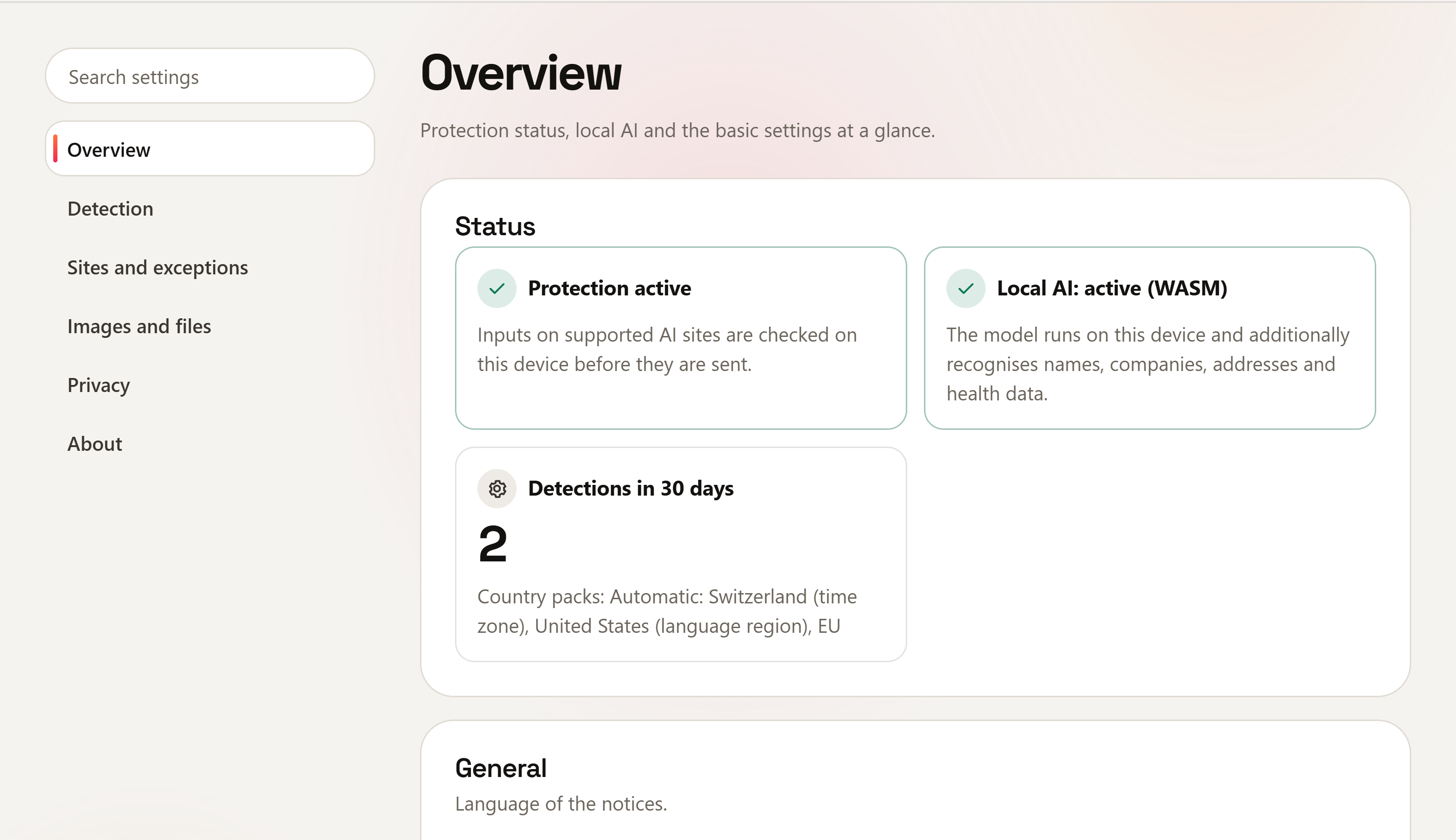
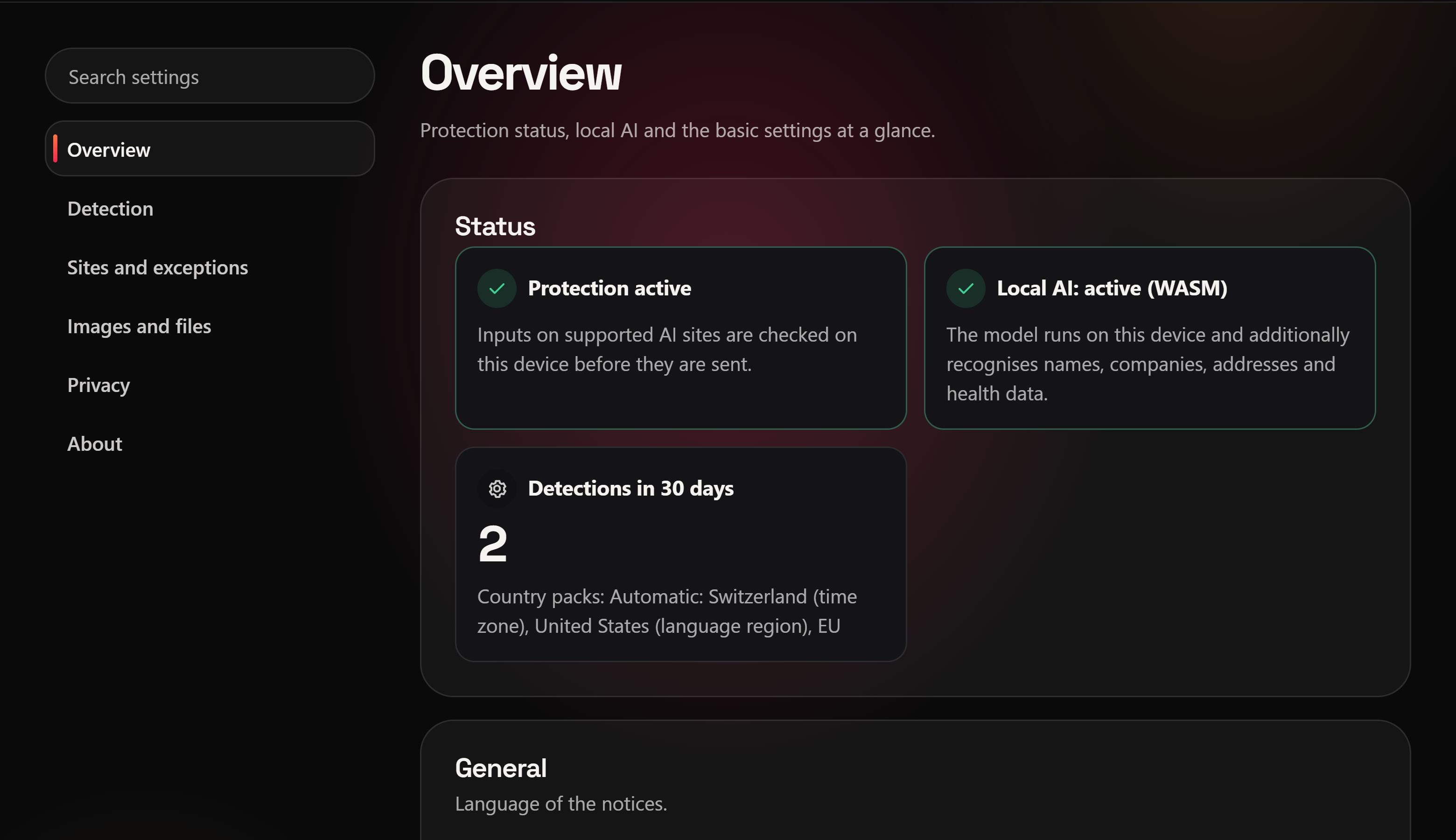
Overview
- Status: "Protection active", state of the local AI (with "What to do:" if it is not running), detections in 30 days and the active country packs.
- General: language (Browser language or fixed EN, DE, FR, IT, PT, ES) and Appearance of this page: Same as system, Light or Dark.
- On managed devices: who manages the extension.
Detection
- Local AI detection: also recognises names, companies, addresses and health data with a model that runs on this device. Nothing is sent; the rules always apply.
- What is detected: switch global packs and country packs on or off (below).
- Action per data type: see below.
- Custom terms: customer names, project code names, internal domains or initials, one per line (at least 3 characters, at most 5 words). Only checksums are stored; they cannot be displayed again. Data type
custom_term. - Check AI answers: sensitive data such as keys or personal data in answers is underlined subtly and named in a notice. Copying is never blocked.
Global packs
Apply regardless of country. All seven are on by default.
| Pack | Key | Examples |
|---|---|---|
| Finance | finance | IBAN, credit cards, card code (CVV), BIC, crypto addresses |
| Technology and credentials | secrets | API keys, tokens, private keys, passwords in configurations, connection strings, public IP addresses |
| Contact data | contact | email address, phone number, date of birth |
| Travel documents | travel | machine-readable lines of passports and ID cards |
| Confidentiality markings | marker | "Strictly confidential", "Internal use only", Purview labels |
| Context risks (identity, health, HR, lists) | context | name + date of birth + address, health and HR data about a person, customer lists |
| Community patterns | community | patterns from the signed catalogue that ships with the extension |
Country packs
National numbers (social security, tax, ID, company) for over 50 countries and regions. The default is Automatic (time zone and language) – locally, without network. With Choose myself you set the checkboxes yourself. How the automatic mode decides: Country packs. All packs and data types: All data types.
Action per data type
Per data type, grouped by pack: Off, Warn (you decide), Redact only (can only be sent redacted) or Block (cannot be sent). Default: protection class high and medium → Warn, low → Off. What the actions do: Warning bar and actions.
Sites and exceptions
- AI sites (approved tools): only visible if your organisation uses AI site control. Button "Allow access to AI sites" (Supported sites).
- Confidential sources (clipboard): enter sites whose copied text triggers a clear warning when pasted into an AI site (checksum only, 30 minutes, memory only). Choice: warn or block. The browser needs your permission once.
- Form guard: checks form fields on the listed sites when they are submitted – whether a person or an AI agent filled them in.
- Hint when copying (AI side panels): if you copy sensitive data on any https page, a small notice reminds you that AI side panels and AI extensions are not checked. Needs access to all https sites, which only you can grant.
- What AImori does not cover: short list, see Supported sites.
- Values marked as not sensitive: number of values you released in the dialog (checksums only, deleted after 30 days), with a "Delete list" button.
Images and files
- Check images: pasted, dropped and uploaded screenshots (PNG, JPEG, WebP) are read locally with text recognition and checked like text.
- Hidden instructions: warns or blocks when pasted text or uploaded text documents contain invisible characters, hidden text or typical override phrases. Heuristic only.
Privacy
- What is stored: only settings, daily counts (90 days), checksums of your own terms, values marked as not sensitive as checksums (30 days) and – if switched on – the monthly numbers of the AI literacy record. Never texts or detections.
- Statistics (this device only): last 30 days per category with all decisions (e.g. redacted, placeholders, not sent, sent anyway, blocked, not sensitive). Reset statistics needs a second click ("Really reset?"). More: Local statistics.
- Evidence report (laws and standards): local report with numbers only, to print or save as an HTML file.
- AI literacy record: counts locally, per data type group and month, how often explanations were shown and how you responded (numbers only, 13 months); can be printed as a self-declared record.
About
Version, how it works ("All checks run locally in your browser.") and, on managed devices, who manages it.
Popup
Click the icon:
- Status: "Protected" – "Inputs to AI sites are checked locally in your browser." If AImori does not recognise the input field: "Not active on this page". If your organisation has not approved the open site (
allowedSites): "Not approved: …" with the site's name. - Local AI: the line "Local AI: …" only appears while the model is loading or when it falls back to the rules.
- Counters Detections today and Detections in 30 days, the gear to the settings at the top right.
- AI training: on a recognised AI site the AI training light with "Open opt-out setting" and "Check another AI site"; otherwise only the button "Check AI training of a site" (AI training light).
- "Access to AI sites is missing. Allow it in the settings." – only if your organisation uses AI site control and access is missing.
- Managed devices: "Managed by …" and, where applicable, a support link.
Per policy (for IT)
The extension reads its policy from the browser's managed storage (schema managed_schema.json in the package). Values that are set are locked for users. Invalid values are discarded individually and safe defaults are used – protection stays on. Deployment: Group Policy, Intune or Registry scripts. A complete sample policy (fictitious company) is included in the package as enterprise/example-policy.json.
Detection and packs
| Key | Type | Default | Effect |
|---|---|---|---|
countryPacks | list | automatic | Country codes (CH, DE, US … and EU). Always takes priority and switches automatic mode off (Country packs) |
autoCountryPacks | true/false | – (user chooses) | true locks to "Automatic", false to "Choose myself" |
globalPacks | list | all seven | finance, secrets, contact, travel, marker, context, community |
rules | object | high/medium → warn, low → off | data type ID → off / warn / redact / block (IDs); also dictionary (company term) and custom_term (custom terms) |
detection | text | ki | ki = rules plus local AI model, regeln = rules only |
uncertainFindings | text | hint | Uncertain findings: hint = hint while typing only, warn = dialog, enforce = like certain findings |
deobfuscation | true/false | true | Detect obfuscated data (invisible characters, look-alikes, Base64, parts spread over messages) |
customTerms | object | – | Custom terms as salted checksums: salt (64 hex characters), hashes (max. 20,000); data type custom_term |
dictionary | object | – | Predecessor of customTerms, still works: salt and hashes (max. 20,000), see below |
customPatterns | list | – | Your own regular expressions (max. 50), reported as "Own pattern (organisation)" |
labelNames | list | – | Names of your own sensitivity labels (max. 50), data type conf_label |
documentFingerprints | object | – | Fingerprints of confidential company documents; reports larger parts of them (document_match) |
massListMin | number 3–1000 | 10 | From this many distinct entries a text counts as a customer list (mass_list) |
identityMinParts | number 2–4 | 3 | Parts for an identity (identity_combo): name + date of birth + further details |
answerCheck | text | hint | Check AI answers: hint = mark, off = off |
Sending and actions
| Key | Type | Default | Effect |
|---|---|---|---|
allowUserOverride | true/false | true | false: no "Send/paste anyway" |
allowNotSensitive | true/false | true | false: no "not sensitive", the local list is deleted |
allowPlaceholders | true/false | true | false: no placeholders such as [IBAN_1] and no answer view with real values |
allowRephrase | true/false | true | "Rephrase safely" button (not with Block) |
blockWhenInactive | true/false | false | Input field not recognised (redesign) → block sending/pasting instead of only showing "!" |
voiceMode | text | warn | Voice mode of the AI sites: allow, warn (message) or block. Dictation into the input field is always checked |
Sites and AI control
| Key | Type | Default | Effect |
|---|---|---|---|
allowedSites | list | all | chatgpt, claude, gemini, copilot, m365copilot. Sending/pasting is blocked on the others of these sites; the list never adds other sites |
aiSiteMode | text | off | Other known AI sites: hint = notice bar, block = block page (AI site control) |
allowedAiSites | list | empty | Approved AI sites (IDs, max. 500): no notice and no block there |
blockedAiSites | list | empty | Always blocked while aiSiteMode is not off; takes precedence over allowedAiSites |
suggestedAiSite | text | empty | Approved AI that the notice and block page point to with "Switch to …" |
accountRules | object | – | Separate level for business and personal accounts (Rules per account) |
trainingAmpel | true/false | true | AI training light in the icon and popup (AI training light) |
sensitiveSources | list | empty | Confidential sources (host names, max. 100) for the warning when pasting |
sensitiveSourceAction | text | warn | Pasting from confidential sources: warn or block |
formGuardSites | list | empty | Form guard: host names (max. 20) whose forms are checked on submit |
copySidebarHint | true/false | true | Hint when copying; only works once the user grants access to all https sites |
Files and images
| Key | Type | Default | Effect |
|---|---|---|---|
imageScan | true/false | true | Check PNG, JPEG and WebP images locally with text recognition; false = images like other files |
blockUncheckedFiles | true/false | false | Blocks uploads, drops and pasted files that AImori cannot check – with this policy, all except images. It checks images itself as long as imageScan is on; images that cannot be checked can then only be cancelled |
hiddenInstructionScan | true/false | true | Check pasted text and text documents (max. 2 MB) for hidden instructions |
hiddenInstructionAction | text | warn | On hidden instructions: warn or block |
tableScan | true/false | true | Report tables (CSV, Markdown, HTML, JSON, XLSX) with lots of personal data as a mass leak |
tableMinRows | number 3–1000 | 10 | From this many data rows a table counts as a mass leak |
tableMinColumns | number 1–10 | 2 | Number of sensitive columns the table needs |
tableRedaction | text | columns | Redacting tables: columns = sensitive columns, rows = also keep only the header and 3 rows |
Language and branding
| Key | Type | Default | Effect |
|---|---|---|---|
language | text | auto | auto, en, de, fr, it, pt, es |
branding | object | – | White label: name, logo, colours, support, notice text for AI sites – see Branding |
Reports and records
| Key | Type | Default | Effect |
|---|---|---|---|
competenceRecord | true/false | true | AI literacy record; false deletes the local counters |
competenceHideSensitive | true/false | false | The record never shows health, personal data and national ID |
complianceReport | true/false | true | Evidence report (numbers only); false = only a notice |
complianceFrameworks | list | all | Templates in the report: revdsg, dsgvo, hipaa, euaiact, iso27001 |
complianceReportDays | number 7/30/90 | 30 | Period of the report in days |
reportingUrl | text (https) | – | reserved, not used (no network code) |
Checksums for dictionary (PowerShell example)
hex(SHA-256(salt + term)), term lower-cased, NFKC, whitespace collapsed to one space; matches for 1–3 words. Review before running – the example only computes locally and writes nothing:
$salt = 'company-salt'; $term = 'sample ltd'
$b = [Text.Encoding]::UTF8.GetBytes($salt + $term)
-join ([Security.Cryptography.SHA256]::Create().ComputeHash($b) | ForEach-Object { $_.ToString('x2') })
Caution
The salt is readable by users. Short or guessable terms can be recovered with name lists – dictionary and customTerms protect against casual reading, not against targeted guessing. Do not include secret terms.